Sotto

Free, private, local dictation for Windows. Hold a hotkey, speak, and accurate text is typed wherever your cursor is — 100% on your device. The open-source voice-to-text alternative to Wispr Flow.

⬇️ Download for Windows ★ Star on GitHub
No cloud · no account · no subscription · open source
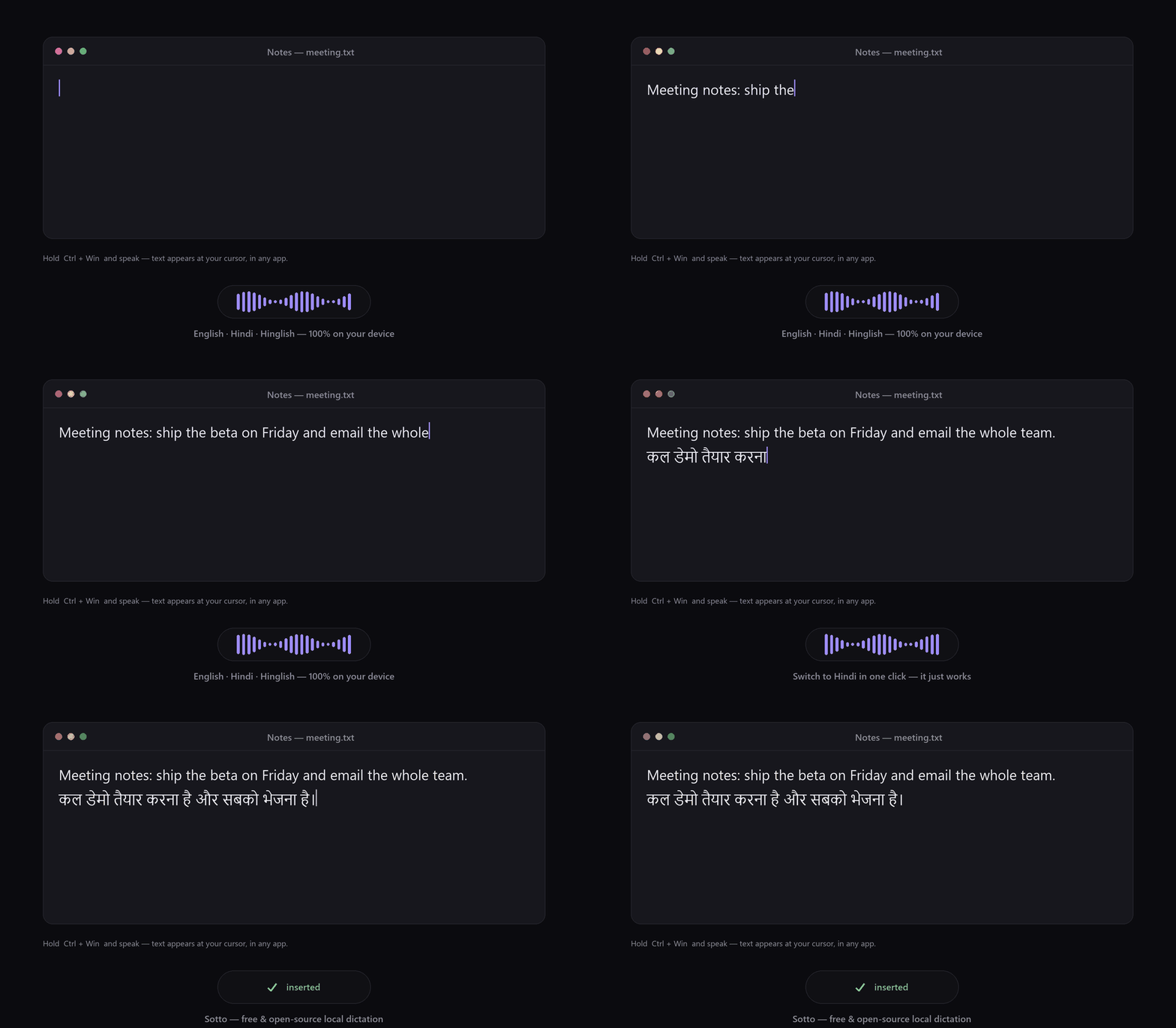
Sotto live voice-to-text dictation demo in English and Hindi
Live dictation in English and Hindi — text appears as you speak.

Why Sotto?

A free, open-source voice-to-text app that keeps your microphone on your own machine — the private alternative to paid cloud dictation.

🔒

100% private

Whisper runs locally on your CPU. Audio never leaves your PC — no cloud, no telemetry.

⌨️

Types anywhere

Terminals, Office, browsers, chat, IDEs — even elevated windows. Works where paste is blocked.

🌍

English + Hindi

Auto-detected per phrase, with Hindi/Urdu correction. Dictate mixed-language meetings.

⚡

Live typing

Toggle mode types as you speak — perfect for hands-free meeting notes.

🧠

Noise-robust

A voice-activity gate ignores static and background noise instead of inventing text.

🪶

Free forever

No GPU required. No fees, ever. MIT-licensed, open-source Python.

Get started in 2 minutes

Download & unzip

Grab Sotto-windows-x64.zip from Releases and unzip it.

Run Sotto.exe

SmartScreen may warn (unsigned) → More info → Run anyway.

Download the model

Settings → Model → Download (one-time, ~300 MB).

Speak

Hold Ctrl + Win, talk, release. Text appears at your cursor. 🎉

How it compares

SottoWispr FlowVoice AccessDragon
Runs 100% offline✅❌✅✅
Free✅💲✅💲💲
Open source✅❌❌❌
Hindi / Hinglish✅✅limited❌
Type as you speak✅✅⚠️✅
No account needed✅❌✅✅
Coming soon · Premium

Unlimited full-file transcription

The live dictation you're downloading is free and open source, forever. We're building an optional premium tier: upload any audio or video — any length, any language — and get an accurate transcript back. Hours-long recordings, meetings, lectures, podcasts, interviews. No limits.

Join the waitlist and we'll build it if enough people want it. No spam, no commitment — just tell us you're interested.

We store only what you enter, in our own database. Your email is never shared or shown publicly.

Guides

Practical, in-depth guides on free, offline voice-to-text for Windows.

🆚

Best open-source Wispr Flow alternatives

Free, offline, private dictation apps for Windows compared honestly.

🔌

Offline voice-to-text on Windows

Set up free, 100% local dictation — no cloud, no subscription, no account.

🇮🇳

Free Hindi & Hinglish voice typing

Dictate mixed English-Hindi speech into any app, fully offline.

FAQ

Is my audio uploaded anywhere?

No. Transcription runs entirely on your CPU. The only network request is the one-time model download you start yourself.

Is Sotto really free and open source?

Yes — MIT-licensed and free forever. The core voice-to-text dictation is open source. The upcoming unlimited full-file transcription is an optional paid tier that funds development.

Does it need a GPU?

No — it's tuned for CPU and runs on a normal laptop. You can optionally use an Intel iGPU.

Windows says "unknown publisher."

The app is unsigned (certificates cost money; Sotto is free). Click More info → Run anyway, or build it from source.

Which languages are supported?

English and Hindi/Hinglish out of the box, with one-click switching. Set "Auto — all languages" for ~99 Whisper languages.